AI clipping without losing the point: a source-first review workflow
Use transcript timestamps, context checks, caption review, and an approved export to turn expert recordings into short clips that preserve the point.
These are partner or affiliate links. Cyber City Media may earn a commission.
Published October 19, 2026 · America/Chicago
An expert can make a careful point in a long conversation and appear to make a reckless promise in a short clip. The words may all be authentic. The problem is the cut: it drops the condition, question, or example that made the answer true.
For consultants, agency owners, coaches, and founders explaining a real offer, that is a production decision worth owning. AI can help find candidate moments and draft captions. A reviewer still has to decide whether someone encountering the excerpt alone will understand the same point as someone watching the source.
What CCM’s implementation supports
CCM’s clipping implementation includes analysis that accepts a timestamped transcript and proposes start and end times, a title, a caption, and a reason for each candidate. Its selection instructions ask for a complete thought and discourage mid-sentence openings. These are useful instructions to a model, not proof that every suggestion preserves meaning.
The implementation also retains a rendered clip’s transcript for caption drafting and supports saved clips with review states. Caption drafting can use what was actually said instead of relying only on the video title. Missing or unusable speech still requires attention: a title is not enough evidence to approve a specific claim.
The workflow below combines those implemented capabilities with an editorial review standard you can apply to your own material. It does not describe a measured customer result or promise that automated checks can judge every nuance.
1. Give the editor a source they can return to
Begin with a recording you have permission to use. Keep the original file, a timestamped transcript, the speaker’s name, and the question being answered together. Define the audience and one useful takeaway before asking for clips. Remove private information from material supplied to production tools.
Treat the transcript as navigation. Check consequential words against the audio: names, numbers, negatives such as “not,” and qualifiers such as “sometimes.” If the transcript changes “can” to “will,” it changes the claim. Correct that passage before requesting a stronger hook.
2. Review the surrounding answer before choosing the cut
Ask for candidate time ranges with a short explanation of the point each one makes. Then watch the lead-in and follow-through around each proposed range. The question may establish who the advice applies to; the next sentence may explain when it fails. A good opening gives a new viewer enough information to follow the answer.
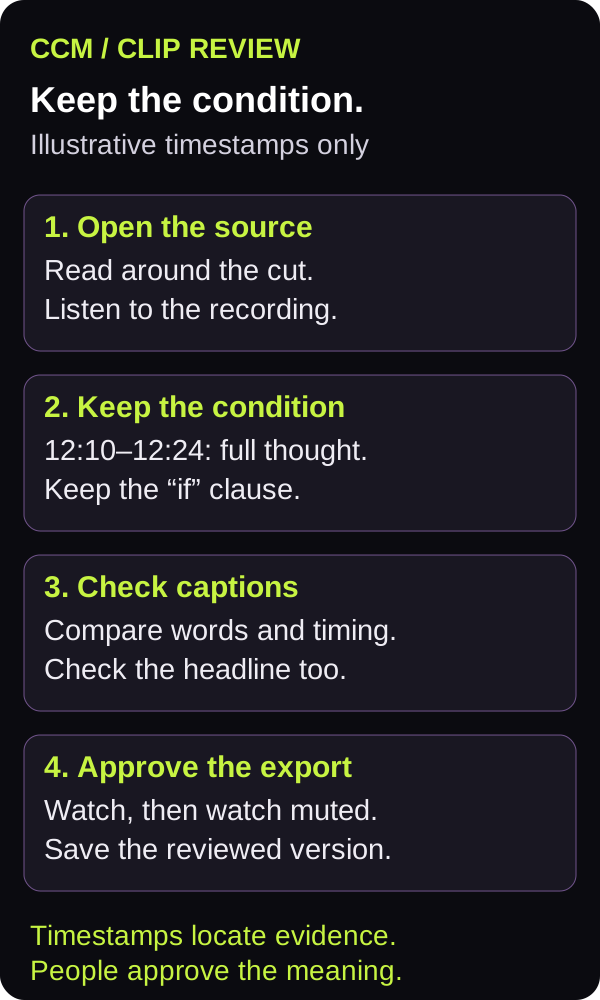
An illustrative consultant example
This fictional example uses invented timestamps to demonstrate the review; it is not a customer recording or result. At 12:04, an interviewer asks whether a team can automate its proposals. At 12:10, the consultant answers:
“You can automate the first draft if someone checks the source and approves the final version. The client’s requirements still decide what belongs in it.”
A proposed 12:10–12:13 cut ending after “first draft” removes the condition. A title such as “Automate your proposals” broadens the claim further. Keep the answer through 12:24 in this example, and use a narrower title: “What to review before using an AI proposal draft.” Check the actual recording for natural boundaries; the illustrative times are not a duration rule.
If that longer answer needs the question to make sense, include the question or a faithful, clearly separate context label. Do not write a new quotation to repair the cut. When the explanation cannot fit the intended format, choose a different moment.
3. Review spoken captions and promotional copy separately
There are two writing tasks. On-screen captions convey the speech and relevant sound. The post title and description frame why someone should watch. Check both against the selected source window: an accurate transcript can still sit beneath an exaggerated headline.
CCM’s caption-rendering code can group word timestamps into short lines, retaining coarser segment timing when word timing is absent. That supports readability; it does not certify that the recognized words are correct. Read the captions while listening, then watch muted to check that the point survives.
W3C’s caption guidance explains that captions include speech and non-speech audio needed to understand the content, such as speaker identification and meaningful sounds. Use that as a review reference when deciding what a viewer needs beyond the spoken words.
Descript is an optional editing tool in CCM’s partner toolkit. If you use it, keep the original recording available and review the exported clip, including any caption corrections. Tool choice does not replace the source comparison.
4. Keep the visual evidence inside the frame
A vertical crop can remove the diagram, slide, or demonstration the speaker is explaining. Preview the chosen layout on a phone. If a sentence refers to “this column,” viewers need to see that column clearly. Consider a wider frame, a split layout, or a different excerpt when one crop cannot carry both the speaker and the evidence.
Check that captions do not cover the evidence or collide with important labels. Listen for clipped opening syllables and abrupt endings. Automated quality signals can help prioritize inspection, but they do not establish that a claim is fair or the demonstration understandable.
5. Approve an exact output, with a useful revision note
Give one reviewer the source range, proposed title, caption text, and final export. Ask them to compare meaning first, then inspect presentation. “Keep the qualification after first draft” is actionable feedback. “Make it punchier” leaves the editor guessing what they may remove.
- Source: recording name and start/end times, with the surrounding answer available.
- Meaning: the question, qualification, and takeaway remain accurate.
- Captions: names, numbers, negatives, timing, and readability checked.
- Frame: the evidence discussed is visible on a phone.
- Release: reviewer, exact approved file, final copy, and intended destination recorded.
If the export or copy changes after review, review the changed version. After an authorized release, open the public clip and check its actual presentation and destination link. A saved approval and a correct public output are separate pieces of evidence.
Bring the source and the stalled step
If your team has useful expertise on record but struggles to turn it into clear excerpts, explore CCM’s production services. Bring a recording, the audience it should help, and the point you want a clip to preserve. Those inputs make the production conversation concrete.
Bring a source recording, your audience, and the point the clip needs to preserve.