What an agentic creative agency does: a repeatable content workflow
Turn one useful recording into a reviewed article, clip, and newsletter with a practical agent-assisted workflow, clear handoffs, and human approval.
These are partner or affiliate links. Cyber City Media may earn a commission.

You have something useful to explain. Maybe it is a question customers keep asking, a lesson from building a product, or an idea worth discussing on a podcast. Turning that knowledge into something people can watch, read, and act on takes several jobs: planning, recording, editing, writing, reviewing, and distributing.
An agentic creative agency combines human creative judgment with task-focused AI agents to support a repeatable workflow. People choose the audience, contribute expertise, and approve the work. Agents can help prepare material, organize it, and produce drafts within a defined assignment. Every handoff needs an owner and a clear definition of done.
The practical question is simple: can you turn one worthwhile idea into useful, reviewed content through a process you can run again?
Start with a question someone actually needs answered
Choose one question from a customer conversation, a community discussion, or your own work. Use material you have permission to share, and remove private details before passing it into production tools.
Write a one-sentence brief:
Help [specific audience] do [specific task] using [experience or evidence we can show].
For example: “Help first-time webinar hosts prepare a remote guest for a clear, organized conversation.” This is an illustrative assignment, not a client case study.
Give that piece one next step. A reader might use a checklist, watch a demonstration, or discuss a production project. Choose the step before creating the assets so the article, clip, and email all have a useful purpose.
A workflow you can repeat
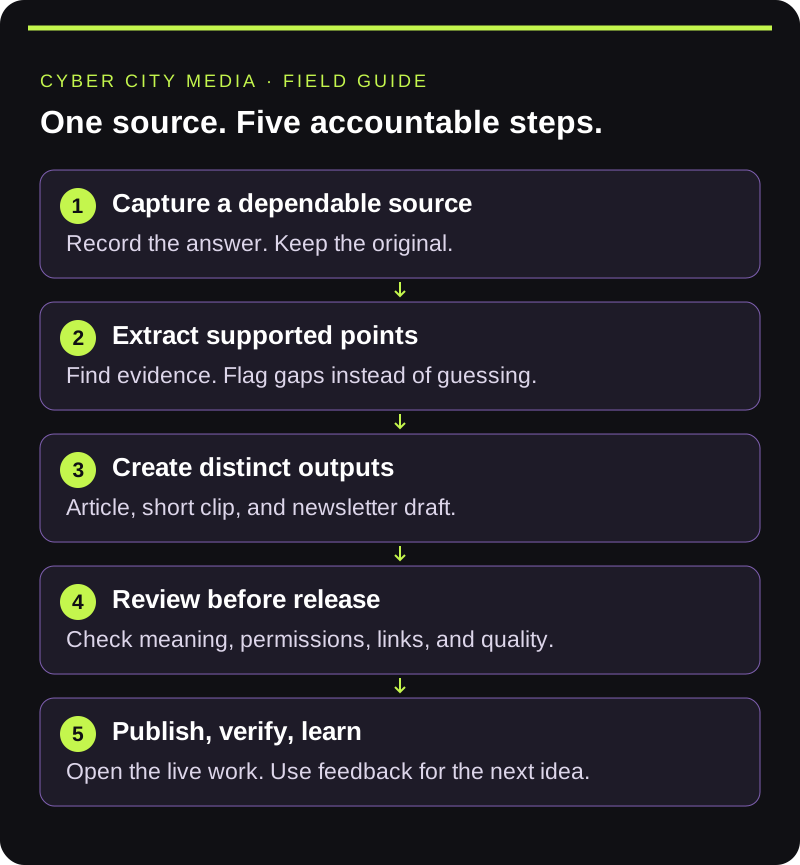
1. Capture one dependable source
Record a focused explanation or interview. For the webinar example, ask a producer to walk through guest preparation: the discussion outline, microphone check, framing, recording permissions, and what to do if the connection drops.
Ask for a demonstration or concrete example whenever the explanation becomes vague. Save the original recording and any supporting notes. A transcript helps with navigation, but check important quotes against the recording.
Your finish line is a source that answers the chosen question, with enough context to support the finished content.
If you are comparing tools for this stage, Riverside is one recording option in CCM's partner toolkit. Choose a setup that fits your guests, source-quality needs, and review process.
2. Extract supported points before drafting
Give an agent the approved source and a bounded task: identify the main steps, find the passages that support them, and flag anything unclear. Ask it to preserve uncertainty rather than fill gaps with plausible details.
For this example, the output might be a list of guest-preparation steps with timestamps. If the speaker says to keep a backup recording, but never explains who owns it, flag that missing responsibility for a human to resolve.
This is an inexpensive point to catch a weak premise. If the source does not answer the question, improve the source before multiplying the assets.
3. Make three outputs with distinct jobs
Start small enough to review properly:
- An article: Explain the whole process and provide a checklist the reader can use.
- A short clip: Demonstrate one specific step, such as checking the guest's microphone. Keep enough context to make it understandable on its own.
- A newsletter: Explain why the question matters, share one useful takeaway, and link to the published article.
Adapt each output to how someone will encounter it. A clip needs a clear opening and readable captions. An article needs a logical sequence. An email needs a reason to click that the destination actually fulfills.
Do not promise a downloadable checklist, registration flow, or additional resource until it exists and works.
Descript is an editing option to evaluate when turning the source into those outputs. Keep the original recording available and review the exported version, not just the draft inside the editor.
4. Review the content and the handoffs
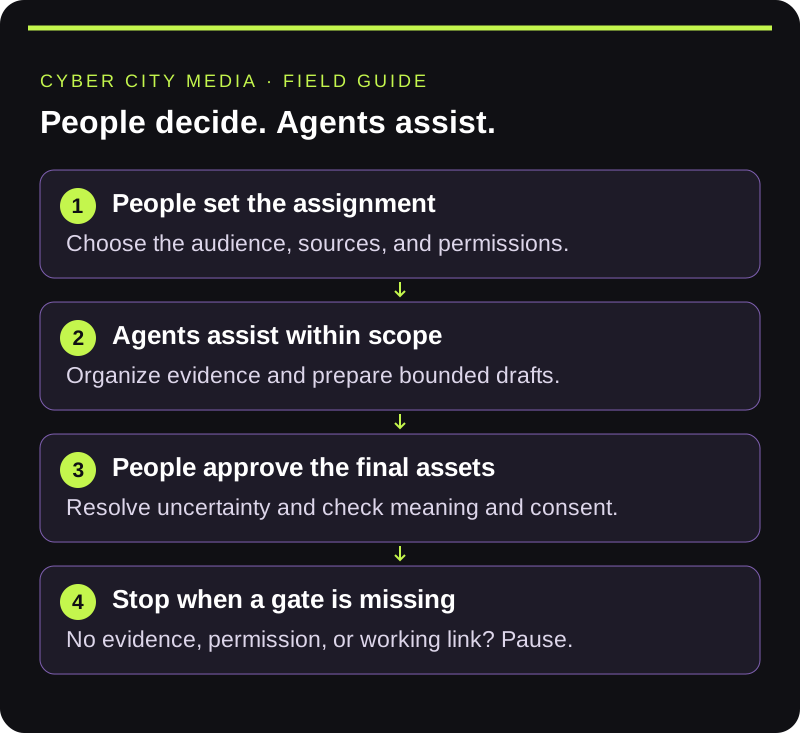
Assign a named reviewer. They should check whether each claim is supported, whether the advice is usable, and whether the finished work sounds like the person or brand behind it.
Watch the clip with sound and without it. Read the article as someone trying the process for the first time. Test the call to action. Check that editing has not changed a speaker's meaning or removed an important qualification.
Keep revisions attached to the asset being reviewed. “Make it stronger” leaves too much room for interpretation. “Show the microphone check before introducing the backup plan” gives the editor a concrete change.
5. Publish, verify, and learn
Release only approved assets through authorized accounts. Open the published article on desktop and mobile, check its links, and confirm the live address before adding it to the newsletter. A proposed slug or preview page is not proof of publication.
After distribution, look for signals that match the piece's purpose: relevant replies, article visits from the email, or qualified project inquiries. Keep those signals separate from views. A widely watched clip and a useful sales conversation answer different questions.
If the plan includes a live broadcast, Restream is another partner-tool option to evaluate. Decide where the broadcast will appear and who owns the final go-live check before scheduling it.
Use the questions people still ask to choose the next topic.
Use this handoff template
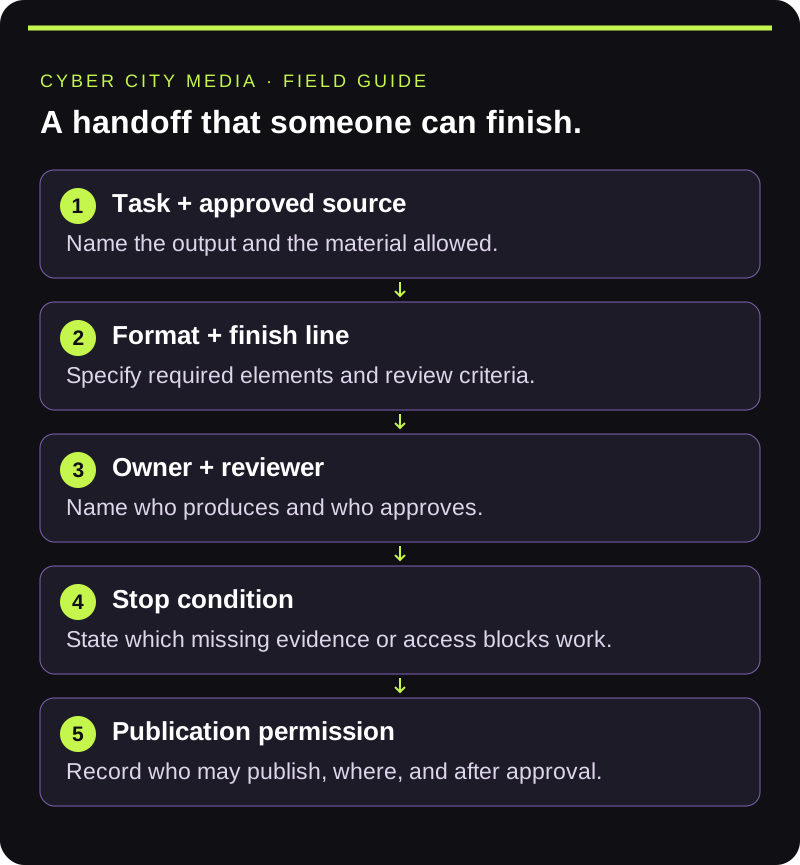
Copy these fields into your project tracker:
- Task: What needs to be produced?
- Approved source: Which recording, notes, or references may be used?
- Output: What format and required elements define a finished draft?
- Owner and reviewer: Who does the work, and who approves it?
- Stop condition: What missing evidence, permission, or technical failure requires a pause?
- Publication permission: Who may publish, where, and after which approval?
For creators, this protects the meaning and voice of the original work. For builders, it makes inputs, outputs, and failures explicit. For operators, it makes responsibility visible.
Keep access and approval deliberate
Drafting access does not need to include publishing access. Give each person or tool only the access required for its task. Keep passwords and private customer information out of briefs. Confirm permission to use guest recordings, music, images, and other source material before release.
Human approval matters most where an error could misrepresent someone, expose private information, or create a commitment. Decide those boundaries before a workflow starts running repeatedly.
Your final publishing checklist
- The piece answers one real audience question.
- Important claims and quotes have been checked against the source.
- Names, captions, credits, and usage permissions are correct.
- Each asset has a named approver and an approved final version.
- The article is live, readable on mobile, and linked correctly.
- The newsletter points to that verified published article.
- The next action works, and someone owns reviewing the response.
Where CCM fits
Cyber City Media offers remote recording and production for podcasts, panels, webinars, and virtual summits, alongside editing, short-form clips, and distribution. These services support the production stages of the workflow above; the right scope depends on what you need to make and who will review it.
Bring one audience question, any source material you already have, and the step where production stalls.
Sign in below. Your access is checked after authentication.